Your personal Facebook profile has a 5,000 friend limit and zero marketing tools. A Business Page has unlimited followers, ad capabilities, and analytics.
Just to give you an idea of how to build a Facebook business page, look at your primary efforts here:
You will need approximately 15 minutes, literally $0, and zero technical skills to make a Facebook business page.
Ready to grow your Facebook presence fast? Boost your reach, post visibility, and engagement instantly with SocialPlug.
You can run ads, collect reviews, and display business info (hours, services, shop) through a Facebook Page. Also, multiple people can control a page through different roles.
What we will be discussing today:
▶
How to set up your page properly (for the very first time)
▶
Which settings directly impact your visibility
▶
How to be friends with Facebook's algorithm from day one
▶
What metrics should you track (and which ones to ignore)
And a few things that you will be needing on the way. Let's build your page.
What Is a Facebook Business Page and Why Do You Need One?
A Facebook Business Page is your official presence on Facebook's 3 billion-user platform.
They are free, customizable spaces for brands, organizations, and creators. It's where you post content, run ads, respond to messages, and convert
scrollers into customers.
Public engagement is the core of a business page. Through Meta tools, you can promote posts, run ads, collect insights, and even sell products.
What Is a Facebook Business Page Used For?
A Business Page helps businesses:
▶
Have a professional public presence
▶
Have better discoverability
▶
Build an audience that you can reach anytime (without renting from Instagram's algorithm)
▶
Share updates, events, and promotions with audiences
▶
Communicate with customers
▶
Run targeted ads with Facebook Ads Manager
▶
Track performance with Page Insights and Meta Business Suite
Benefits of Having a Facebook Business Page
▶
Having an online presence without requiring a website
▶
You can reach specific audiences based on location, age, interests, and behavior. Also, you can track page visitors and show them ads later.
▶
Maintaining communication with customers through direct Messenger chat
▶
Creating loyal followers through groups and interactive content
▶
Accessing detailed metrics regarding engagement, reach, and audience
▶
Connecting with Instagram and WhatsApp for unified brand management
Who Can Create a Facebook Business Page?
Anyone with a personal Facebook account. You need:
▶
A verified email/phone number on your personal profile
▶
To not be banned or restricted
▶
Not more than 15 minutes
That's it. No business registration, tax ID, or LLC required. Just click and build.
Feature
Personal Profile
Business Page
Follower limit
5,000 friends max
Unlimited
Can run ads
No
Yes
Analytics
None
Full suite
Multiple managers
No
Yes
Appears in Facebook search
Limited
Optimized
Call-to-action buttons
No
Yes
Gets shut down for commercial use
Eventually
Never
How to Create a Facebook Business Page? - Step-by-Step Setup
Now, let’s walk through the step-by-step guide on how you can create a business page on Facebook.
Before you start clicking, gather these:
▶
Logo (square, 180x180px minimum; Facebook will crop it)
▶
Cover image (820x312px; this is desktop size, mobile will crop)
▶
Business name (exactly as you want it to appear; you get 1 free change)
▶
Category (check competitors' pages to see what they use)
▶
Bio (155 characters max)
▶
Website URL (if available)
▶
Contact info (phone, email, location if applicable)
How to create a Facebook Business Page from a desktop?
On your desktop:
Step 1 – Go to Facebook.com/pages/create
▶
Open your personal Facebook profile and, on the left sidebar, find “Pages”
▶
Click “+ Add” and select “Add a Page” if it’s already created, or “Create a Page” if it’s not created already
▶
Choose the Page you want to connect to
▶
Assign permissions to team members, making them admins, editors, and others.
How to Customize and Optimize Your Facebook Business Page?
The next step is to personalize and optimize your business page.
How to Add a Username (Page Handle) on Facebook?
Your username is your @handle. It appears in your URL and when people tag you.
To set it up:
▶
Go to your Page → Settings → General Page Settings
▶
Under Username, click Edit
▶
Enter a unique handle, which reflects your brand (avoid symbols or spaces)
▶
Keep it identical to your Instagram handle if possible. Makes cross-promotion cleaner.
▶
Following approval, it becomes part of your custom page URL
How to Create a Custom URL for Your Business Page?
By default, your URL is “facebook.com/YourPage-109381093810938”; a random number mess.
After you set your username, your URL becomes: “facebook.com/YourUsername”
How to Write a Perfect “About” Section and Description?
Your About section is where visitors get information about your brand.
Tips for writing a strong but concise description:
▶
Keep it under 255 characters
▶
Include your brand’s mission, offerings, and tone
▶
Use relevant keywords
Example: “We craft organic skincare products with our own hands to keep your skin nourished. Shipping worldwide.”
How to Add and Manage Page Tabs?
You can organize your page with tabs that show different sections like Home, About, Photos, Reviews, and Shop.
To manage these tabs:
▶
Go to Settings → Templates and Tabs
▶
Add, remove, or reorder tabs based on your business type
For example, a retail store can activate the Shop tab. Or if you are a service provider, you may prefer Reviews or Services.
How to Add a Call-to-Action Button (CTA) on Your Page?
CTA buttons can encourage your visitors to take action.
To add it–
▶
On your Page, click “+ Add Action Button” below your cover photo
▶
Choose an action (visit website, book appointment, message, etc.)
▶
Save the changes
Confused about the CTA?
Your Goal
Use This CTA
Link It To
Get phone calls
Call Now
Your phone number (clickable)
Sell products
Shop Now
Your store or product page
Collect emails
Sign Up
Landing page with email form
Book appointments
Book Now
Calendly or a booking system
Start conversations
Send Message
Messenger (auto-opens chat)
Drive web traffic
Learn More
Your homepage or specific page
How to Set Up Messaging and Automated Responses?
You can chat with your customers instantly through Messenger integration.
To activate:
▶
Go to “Inbox”, then “Automations”, and “Create Automation”
▶
Set up quick replies, away messages, FAQs, etc.
This will help you be responsive even if you are offline. 53% of people prefer messaging businesses over calling
With Business Suite Inbox, you can maintain communication from one platform across Facebook and Instagram.
How to Invite Friends and Contacts to Like Your Page?
Your page can gain momentum by building an initial audience. For that-
▶
Click “…” → Invite Friends on your page sidebar
▶
Select friends from your personal account to send invites
▶
Share your page link in groups, WhatsApp, or email newsletters
Try encouraging your followers to tag your page in their posts. It will help increase your organic reach.
How to Manage Your Facebook Business Page?
To manage your page efficiently, you can assign different roles to others. At the same time, posting and interacting with your audience regularly will help your page look vibrant and professional.
How to Assign Page Roles and Permissions?
For efficient page management, you can add team members or collaborators.
To assign roles:
▶
Go to your Facebook Page → click “Settings” → “New Pages Experience” → “Page Access”
▶
Click “Add New” under “People with Facebook access”
▶
Type the person’s name or email and choose their role
▶
Click Give Access
▶
Confirm with your password
What Are the Different Facebook Page Roles?
Admin
Admins have full control of a page. They can manage others’ roles, edit settings, and publish content.
Editor
Editors have the authority to create and manage posts, reply to comments, and view insights.
Advertiser
This group can only run ads and view insights.
Moderator
Moderators are empowered to manage comments, messages, and maintain community interactions.
Analyst
Analysts can only view insights and performance metrics.
How to Remove Someone?
Same menu → Click X next to their name → Confirm
How to Post Content as Your Page?
To post as your page instead of your personal profile-
▶
Switch to your page using the profile switcher in the top right
▶
Click “Create Post”
▶
Add text, images, videos, or links
▶
Click “Post” to publish
What Types of Posts Work Best for Business Pages?
▶Photos & Videos: Through such content, you can showcase your products, behind-the-scenes moments, or customer stories
▶Reels: Since short-form videos perform the best these days, you can increase your engagement with reels
▶Links: You can share blog posts, offers, or website pages on your page
▶Polls & Questions: With these, you can encourage your audience to interact more
Struggling to get traction on your posts? If your quality content isn't getting seen, you can buy Facebook post likes.
This will make it easier for you to plan a full week’s content in one sitting.
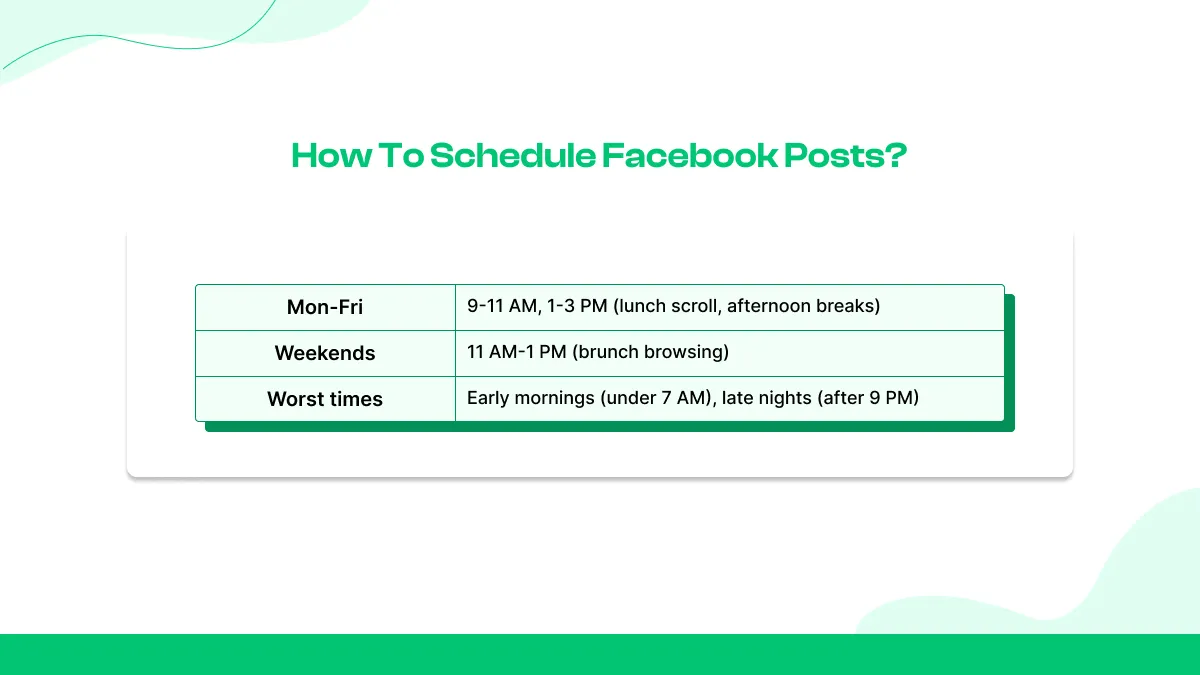
Best Times to Post on Facebook Business Pages
Mon–Fri
9–11 AM, 1–3 PM (lunch scroll, afternoon breaks)
Weekends
11 AM–1 PM (brunch browsing)
Worst times
Early mornings (under 7 AM), late nights (after 9 PM)
How to Manage Comments and Messages Effectively?
Tips for managing communication:
▶
View and reply to all messages and comments with Meta Inbox
▶
Use automated replies for FAQs, greeting messages, and response-time updates
▶
Prioritize unread or urgent messages with filters
▶
Always respond politely
▶
Reply within 24 hours to improve your response rate
Meta Business Suite’s Insights tab will help you figure out what posts get the most engagement. Use the data to adjust your content strategy and posting frequency.
How to Promote and Grow Your Facebook Business Page?
After creating your page, the real challenge lies in forming an audience base and keeping them engaged.
How to Get More Likes and Followers on Your Facebook Business Page?
Here’s what works best:
▶Post regularly: Share content 3–5 times a week
▶Use engaging visuals: You can get better engagement with photos, reels, and videos
▶Interact with followers: Ensure prompt interaction with your followers by getting back to their messages or replying to their comments
▶Optimize timing: Find out when your audience is most active, and post during that time
▶Run occasional contests or polls: Such things help encourage more engagement and participation from the audience
If you're starting from zero and want to build initial social proof, you can buy Facebook followers to establish that foundation.
Paid promotion helps your page reach more people beyond your current followers.
How to Boost a Post vs. Create an Ad Campaign?
You will find a “Boost Post” option under an already published post. Click it, and choose your audience, budget, and duration. Your visibility will be highly increased with such boosting.
Meanwhile, to create an ad campaign, go to Meta Ads Manager. Set objectives like page likes or website visits, target specific demographics, and track performance metrics.
Consider enhancing your top posts. You can buy Facebook reactions.
Through cross-promotion, people from other spaces can discover your Facebook page.
You can:
▶
Add your Facebook link to your other profiles
▶
You can also include the link in your email signature and newsletter footers
▶
Embed your page on your website’s contact or footer section using Facebook’s Page Plugin
How to Join or Create Facebook Groups Related to Your Business Niche?
An amazing way to reach your audience organically is Facebook Groups.
▶Join niche groups: Join communities related to your product or service. Answer questions, share insights, and link your page only when relevant.
▶Create your own group: Build a space for your followers or customers to connect. Use your business page as the admin to build authority.
How to Collaborate With Influencers and Partners on Facebook?
Partnering with other creators or brands can help with your visibility.
Look for micro-influencers with 1K–50K followers, who have audiences similar to yours. You can collaborate with them. You can also use Facebook Collab posts to co-author posts with other pages.
Offering giveaways or co-branded campaigns with similar or complementary brands can also help reach new audiences.
Track results through Meta Business Suite insights or unique tracking links.
How to Analyze and Improve Page Performance?
Meta provides built-in tools like Facebook Insights and Meta Business Suite Analytics.
How to Use Facebook Insights or Meta Business Suite Analytics?
You can get a proper overview of your page’s performance from Facebook Insights and Meta Business Suite.
To access analytics, first go to your Facebook page. There, click “Insights” on the left-hand menu. Or, open Meta Business Suite and select “Insights” under the “Analyze” tab.
There, you will find the performance data for your posts, stories, ads, and followers.
What Are the Most Important Facebook Metrics to Track?
Key metrics that matter most for business pages:
▶Reach: This refers to the number of people who saw your content
▶Engagement: Number of likes, comments, shares, and clicks your posts received
▶Engagement Rate: Percentage of people who engaged with your content after seeing it
▶Page Likes & Follows: These indicate audience growth over time
▶Post Performance: Data on which types of posts get the most interaction
▶Demographics: Find out the age, gender, and location of your audience so that you can adopt strategies accordingly
After you get these insights, refine your approach accordingly. Post more of what your audience prefers.
How to Check Engagement Rate, Reach, and Followers Growth?
Go to Meta Business Suite → Insights → Content or Audience tabs.
There you’ll find:
▶Engagement Rate: It shows how engaging your content is compared to its reach. To ensure a healthy engagement, it’s better to maintain a 2–5% engagement rate.
▶Reach: This indicates how many unique users saw your posts. Measure your promotion effectiveness by comparing organic and paid reach.
▶Follower Growth: This will allow you to track how your follower count changes over time. Figure out if your followers increased significantly during any specific campaigns or after any specific post.
Below 2% engagement? To improve these metrics while you refine your content strategy, you can temporarily buy Facebook views.
A/B testing will help you compare two versions of a post. With that, you can find out which performs better.
To run a test:
▶
Go to Meta Business Suite → Experiments → A/B Test
▶
Choose two variations of a post (different image, caption, or posting time)
▶
Facebook distributes both versions to separate audience groups
Review performance after a few days. It will help you identify which version brings in better engagement or reach.
Also, test one variable at a time. For example, change only the image or caption. It will help you get clear results.
How to Adjust Your Content Strategy Based on Analytics?
Shape your strategy based on the analytics.
Make sure to:
▶Post more of what works: If videos or carousels get higher engagement, focus on those formats
▶Optimize posting times: Post your content when your audience seems to engage with your posts the most
▶Revisit low-performing content: Posts that are not performing as per your expectations, you can try updating their captions, visuals, or CTAs
▶Target the right audience: If a specific demographic tends to be your main audience, you need to adapt your posts, visuals, and tone accordingly
▶
Make sure to check the analytics at least once a week. Reviewing them regularly will help you figure out trends promptly and adjust your strategy.
Best Practices for Facebook Business Pages
Below are some best practices to keep your page compliant and growth-focused.
What Are the New Facebook Page Features?
Here are a few key updates you should know:
▶Professional Mode Integration: Facebook pages now offer analytics and monetization tools, similar to creator profiles. With these analytics and tools, small businesses can get deeper insights into audience behavior.
▶Enhanced Messaging Automation: Users can now opt for AI-driven auto-replies and FAQ templates with Meta Business Suite Inbox. This significantly helps improve customer response time.
▶Improved Reels & Video Performance Metrics: Short-form videos are the most popular form of content. You can now track watch time, retention, and follower conversion from Reels directly in Insights.
▶Streamlined Ad Creation: Facebook’s Advantage+ suite automates audience targeting and placement optimization. It helps users reach ideal customers faster.
How to Stay Compliant with Facebook’s Page and Ad Policies?
Facebook regularly updates its policies to maintain transparency and trust.
To avoid restrictions or page bans–
▶
Avoid misleading content or exaggerated claims, especially in ads
▶
Disclose sponsored content clearly during collaborations
▶
Use licensed music and media in videos and Reels
▶
Review ad policies for restricted industries like health, finance, or political topics
Balancing Organic Posts With Paid Promotions
Organic community building with targeted paid reach can do wonders for you.
▶Organic content: Behind-the-scenes posts, customer stories, educational tips, etc. content will help you keep your audience engaged.
▶Paid promotions: You can reach new audiences faster by boosting your top-performing posts or running ad campaigns.
Use the 70/30 rule. Post 70% organic content to tell stories and engage with audiences, and make 30% paid promotions to amplify your best-performing content.
Use Socialplug to Grow More on Facebook!
You’ve set up your Facebook Business Page. It looks good, runs fine, and you understand how to post and track what works. That’s the solid start most people skip.
But now comes the crucial part; getting real traction.
A new page with zero followers feels like an empty restaurant at dinner time. People hesitate to walk in.
Socialplug helps you fix that. You can buy real engagement: likes, followers, and comments, just to make your page look active and trusted from day one. It’s about kickstarting momentum so your real audience feels confident to join in.
Build your page right. Post often. Talk to your followers.
Then use Socialplug to give your growth a smart push. Your next viral post isn’t far off.
Yes. Go to Settings → Linked Accounts → Instagram. Then click “Connect Account” and log in to your Instagram profile. Linking your Instagram account will allow you to cross-post content, run ads, and manage messages from one dashboard.
Is a Facebook Business Page free?
Yes, creating and managing a page is free. You only pay if you decide to run ads or boosted posts.
Can I have multiple Facebook Business Pages?
Yes. You can manage multiple Pages under one Facebook account through Meta Business Suite.
How to verify your Facebook Business Page?
Go to Settings → Page Verification → Verify Page. You’ll be asked to provide a business phone number, email, or official document. Meta will review your information and notify you once verified.
How to merge two Facebook Pages?
You can merge two Pages if they represent the same business and have similar names. Go to facebook.com/pages/merge, select the two Pages you want to merge, and confirm which Page to keep. The other page will be removed, and its likes and check-ins will transfer. However, posts and photos will not carry over.
Why can’t I create a Facebook Page?
Account restrictions, too many recent page creations, or violations of Meta policies can cause that. Verify your Facebook account and make sure you’re not using an already taken business name. If the issue persists, clear your browser cache or try creating the page from Meta Business Suite.
Tasnim is a content and digital marketer born in Dhaka, Bangladesh. For over thirteen years, Tasnim has worked as a freelancer for several social media marketing companies. He has acquired skill sets in copywriting, content marketing, SEO & social media marketing. He’s one of the founding members of SEOSkit, a very exciting search engine marketing startup. In his free time he likes to travel, read, and make failed attempts at music.
0 Comments
Sort by:
Relevance
JB
Jack Bellingham
Great tips! I never realized how much engagement impacts growth more than just posting frequently. I've been focusing only on content, but now I see how interacting with my audience can make a difference. Time to step up my strategy!
NF
Nicholas Feyenoord
Super helpful article! I always thought Facebook Groups were just for discussions and never really considered them as a tool for growing followers. The idea of actively engaging and sharing valuable content in relevant groups makes so much sense. I'll definitely start participating more and see how it impacts my page. Thanks for the great advice!
Thank you! Your submission has been received!
Oops! Something went wrong while submitting the form.

.webp)
.webp)












0 Comments
Great tips! I never realized how much engagement impacts growth more than just posting frequently. I've been focusing only on content, but now I see how interacting with my audience can make a difference. Time to step up my strategy!
Super helpful article! I always thought Facebook Groups were just for discussions and never really considered them as a tool for growing followers. The idea of actively engaging and sharing valuable content in relevant groups makes so much sense. I'll definitely start participating more and see how it impacts my page. Thanks for the great advice!